Geometry Health separates safe cleanup from repairs that require judgement.
Geometry Health checks technical geometry quality
Check & fix geometry is the review-oriented validation workflow for editable vector layers. It checks the structure and topology of points, lines, polygons and their multipart equivalents without pretending that technical validity proves the mapped information is factually correct.
A polygon can be perfectly valid and still represent the wrong boundary. Geometry Health can identify or repair geometry problems; it cannot decide the correct real-world location for you.
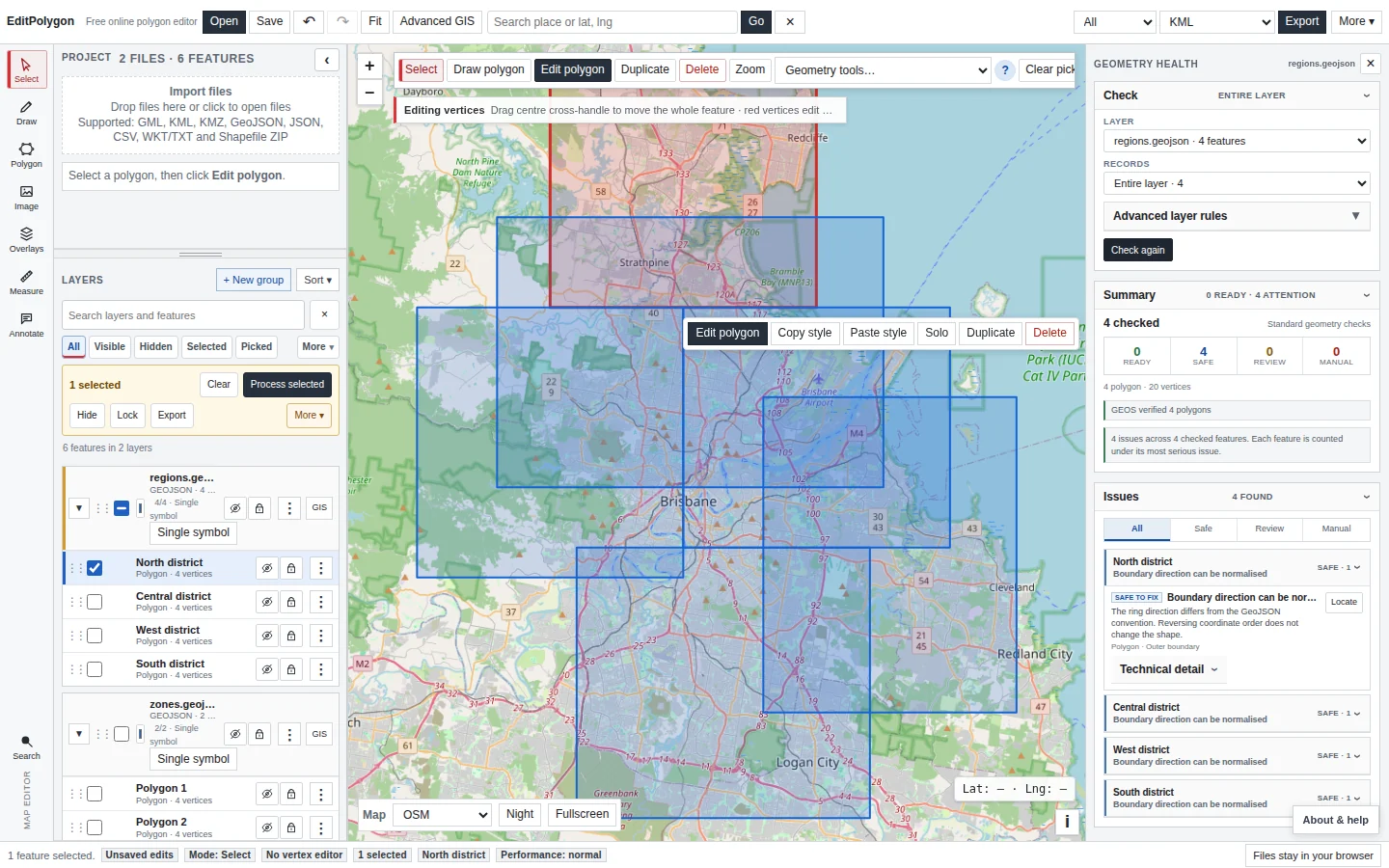
Open Geometry Health
Choose Check & fix geometry from the More menu, or open it through the GIS actions for an editable layer. The current layer is selected when possible, and you can change the layer and scope inside the panel before running the check.
Use scope deliberately. A partial check is useful for focused work, but a repaired layer based on only part of the source must not be mistaken for a complete replacement dataset.
Understand the standard checks
The standard validation pass looks for structural problems such as invalid/missing coordinates, repeated coordinates, collapsed components, polygon ring problems, self-intersections, invalid hole placement and robust topology issues where the GEOS engine is available.
An ordinary open LineString is valid line geometry. A line is not considered invalid merely because its two endpoints do not meet.
Read the result categories correctly
- Ready — no problem covered by the active checks was found.
- Safe to fix — conservative cleanup can be applied without meaningfully changing represented shape, such as removing exact consecutive duplicate vertices.
- Needs review — a proposed repair can change geometry structure or shape and requires explicit judgement.
- Manual review — EditPolygon can identify a concern but should not automatically decide the correct interpretation.
Select or locate an issue to bring the affected feature into view. Open technical detail only when the lower-level validator/engine information is useful.
Apply safe cleanup first
Choose Fix safe issues to apply only the conservative class of cleanup. The layer is rechecked afterwards, so a feature can become Ready while a separate review issue remains unresolved.
Operations that require a semantic decision—such as deleting records because their geometry happens to be identical—are not silently included in this bulk cleanup.
Review shape-changing repairs
For a consequential issue, create the repair proposal and compare the original and proposed result. Geometry Health reports relevant changes such as geometry type, vertex count and area/length differences so you can judge the effect rather than accepting “valid” as sufficient.
A self-intersecting Polygon may legitimately become a MultiPolygon after MakeValid. That can be the correct topological result, but it is consequential and should be reviewed on the map.
When available, the browser-local GEOS engine provides robust validity/MakeValid behaviour. If the robust engine is unavailable, Geometry Health identifies the degraded/fallback state rather than presenting it as equivalent.
Use Advanced rules only when they fit the dataset
Optional dataset rules answer a different question from basic geometry validity. They describe how this dataset is expected to behave.
Current rules are shown only for compatible geometry and include checks such as:
- Exact duplicate features.
- Polygon overlaps.
- Line self-intersections/crossings.
- Dangling line endpoints.
Changing an Advanced rule stages a new configuration. Run the updated check explicitly so you know which rule set produced the displayed results.
Polygon overlap may be wrong in a cadastral coverage and completely legitimate in overlapping hazard or operational-zone layers.
Create a repaired layer
When the accepted fixes are satisfactory, choose Create repaired layer. The normal workflow preserves the source and creates a project layer carrying the repaired features plus Geometry Health provenance.
The result participates in normal project history, so creation can be undone. Inspect the new layer's count, geometry families and map shape before treating it as the new authoritative working copy.
Export validation reports
Geometry Health can export machine-readable/report-oriented output for review outside the editor. Use reports when data quality decisions need to be documented separately from the repaired GIS layer.
Geometry Health versus Processing → Fix geometries
Best when you want to understand problems, locate them, separate safe changes from consequential ones and explicitly review repairs.
Best when you already understand the maintenance policy and need the standard cleanup/MakeValid operation applied consistently over an explicit All, Filtered or Selected scope.
Both workflows use shared geometry-health/robust geometry capabilities; they serve different user workflows rather than implementing unrelated repair logic.
Do not repair a CRS problem as geometry
If coordinates appear to use the wrong CRS, switch to the CRS workflow. Projected eastings/northings interpreted as longitude/latitude are a coordinate-reference problem, not a self-intersection or ring problem.
- The intended layer and scope were checked.
- Safe cleanup was distinguished from repairs that change shape or structure.
- Optional topology rules are appropriate for this dataset.
- Consequential repairs were compared with the original on the map.
- The repaired layer has plausible feature and geometry counts.
- Unresolved issues are understood before further Processing or export.
Common questions
Should I automatically repair every geometry warning?
No. Safe cleanup can be automated, but shape-changing or topology-changing repairs should be reviewed because a technically valid result may not match the intended boundary.
Can a valid polygon still be wrong?
Yes. Geometry validity checks topology and structure; they cannot prove that the feature is in the correct location or follows the intended real-world boundary.